Home Features How It Works See the App Pricing FAQ Guide Log In โ†’

User Guide

Everything you need to know
in one place

From planning your first week to installing ForkTasker on your phone โ€” we've got you covered.

Get started

Up and running in 3 steps

1

Create your account

Sign up at app.forktasker.com. Your 7-day free trial starts immediately โ€” no credit card required.

2

Set your preferences

Answer 5 quick questions about your household, dietary needs, and favourite cuisines. Takes about 60 seconds.

3

Talk to your Chef

Open My Chef and type what you want. "Dinners for the week, Italian and Mexican" is all it takes to get a full plan.

Feature guide

How each feature works

more โ€บ
9:41
๐Ÿด
Hey! What can your Chef help you with today?
Dinners for the week, Italian and Mexican
๐Ÿด
On it! Searching Italian and Mexican recipes for youโ€ฆ
๐Ÿ‡ฎ๐Ÿ‡น Chicken Cacciatore
Italian ยท 35 min
๐Ÿ‡ฒ๐Ÿ‡ฝ Enchiladas Verde
Mexican ยท 40 min
๐Ÿด
Saved your full week! Head to My Plan to review it. ๐ŸŽ‰
Ask your Chefโ€ฆ
โ†‘

Talk to your AI Chef

Just type in plain language โ€” no menus, no filters needed.

  • 1
    Tap My Chef in the bottom nav Available on every screen โ€” look for the chef's hat icon.
  • 2
    Tell Chef what you want Try: "dinners for the week", "quick 30-minute meals", "something Italian tonight", or "plan the whole month".
  • 3
    Chef searches real recipes Every suggestion comes from our curated library of 10,000+ recipes โ€” nothing made up.
  • 4
    Refine in conversation Swap a meal, add breakfast, change Monday to Greek โ€” just ask and Chef updates your plan.
๐Ÿ’ก Tip: The more detail you give, the better. "Weeknight dinners under 30 minutes, no seafood, I have chicken in my pantry" gets you a far more personalised plan than just "dinner ideas".
9:41
Plan the whole month of August โ€” dinners only, mix of cuisines
๐Ÿด
Planning all 4 weeks with zero repeats! Here's Week 1โ€ฆ
Week 1 ยท Aug 3โ€“9
Mon: Spaghetti Carbonara ๐Ÿ‡ฎ๐Ÿ‡น
Tue: Chicken Tikka Masala ๐Ÿ‡ฎ๐Ÿ‡ณ
Wed: Thai Basil Stir Fry ๐Ÿ‡น๐Ÿ‡ญ
Add one Italian dinner per week and make sure no repeats across all 4
๐Ÿด
Done โ€” one Italian dish added to each week, zero repeats across all 4 weeks! โœ…
Ask your Chefโ€ฆ
โ†‘

Multi-week planning

Chef can plan days, weeks, or an entire month in one conversation.

  • 1
    Ask for multiple weeks at once "Plan the whole month of August, dinners every day with dessert on weekends."
  • 2
    Chef builds each week with no repeats Recipe IDs are tracked across all weeks โ€” the same dish will never appear twice.
  • 3
    Refine each week in conversation "Add one Italian dinner to each week" or "swap Wednesday week 2 for something Greek".
  • 4
    All weeks are saved to your account Scroll back and forward in My Plan to see any week.
๐Ÿ’ก Tip: Use the Household Rules field in your Profile to tell Chef things that always apply โ€” "one Italian dinner per week" or "no spicy food on weeknights". Chef reads this every session automatically.
9:41
My Plan
โ€น Jul 7โ€“13 โ€บ
Monday
๐ŸŒ… Blueberry Lemon Quinoa
๐Ÿ‡ฎ๐Ÿ‡น Chicken Cacciatore
Tuesday
๐Ÿฅž Oatmeal Blueberry Pancakes
๐Ÿ‡ฒ๐Ÿ‡ฝ Enchiladas Verde
Wednesday
๐Ÿณ Cheesy Baked Eggs
๐Ÿ‡น๐Ÿ‡ญ Thai Basil Stir Fry
๐Ÿ›’ Instacart
๐Ÿ“ง Email
๐Ÿ–จ๏ธ Print

Your weekly meal plan

See your full week at a glance โ€” tap any meal for the full recipe.

  • 1
    Tap My Plan in the bottom nav Your current week shows by default. Use the arrows to navigate to any past or future week.
  • 2
    Tap any meal for the full recipe Ingredients, instructions, prep time, and nutrition โ€” everything you need to cook it.
  • 3
    Swap a meal instantly Hit the โ†บ Swap button on any slot to replace it with a similar recipe that fits your preferences.
  • 4
    Email, print, or build your cart Email your plan for the week, print it for the fridge, or tap Instacart/Walmart to shop.
๐Ÿ’ก Tip: Tap the calendar icon to switch to Month View โ€” see dot-per-day summaries for the whole month and jump to any week with one tap.
9:41
Shopping List โ€” Jul 7โ€“13
๐Ÿฅฆ Produce (6)
Garlic, 4 cloves
Roma tomatoes, 3
Spinach, 2 cups
๐Ÿฅฉ Meat & Seafood (4)
Chicken breast, 2 lbs
Ground turkey, 1 lb
๐Ÿฅ› Dairy & Eggs (3)
Eggs, 1 dozen
Parmesan, 4 oz
๐Ÿ›’ Build Instacart Cart

Shopping lists & carts

ForkTasker builds your grocery list automatically โ€” deducting what you already have.

  • 1
    Open My Plan and tap "Build Instacart Cart" ForkTasker combines all ingredients from every recipe in your week into one consolidated list.
  • 2
    Pantry items are automatically deducted Ingredients you've added to your Pantry โ€” including staples like olive oil and salt โ€” are removed from the list.
  • 3
    Cart opens in Instacart or Walmart All items are pre-loaded โ€” just review, choose your store, and check out.
  • 4
    Email your shopping list instead Prefer to shop in-store? Hit "Email Shopping List" to get a categorised list sent to your inbox.
๐Ÿ’ก Tip: Add your Staples in the Pantry tab (things you always have โ€” olive oil, salt, garlic). They'll be automatically removed from every shopping list you ever build.
9:41
My Pantry
Chicken breast protein
Olive oil staple
Garlic staple
Jasmine rice pantry
Canned tomatoes pantry
Parmesan dairy
๐Ÿ“ท Scan Receipt

Pantry & receipt scanning

Tell ForkTasker what you have โ€” and it plans around it.

  • 1
    Add items to your Pantry manually Type any ingredient and tap Add. Items stay in your pantry until you remove them.
  • 2
    Or scan a grocery receipt Tap "๐Ÿ“ท Scan Receipt", photograph your receipt, and ForkTasker reads it automatically โ€” adding everything to your pantry in seconds.
  • 3
    Set your Staples Mark things you always keep stocked (olive oil, salt, garlic) as Staples โ€” they're deducted from every shopping list automatically.
  • 4
    Ask Chef to cook from your pantry "What can I make tonight with what I have?" โ€” Chef sees your pantry and suggests recipes that use what's already there.
๐Ÿ’ก Tip: Use Smart Plan (the โœจ button in My Plan) to build a full week that maximises pantry ingredients โ€” Chef picks recipes that share ingredients to cut your shopping list down.
9:41
Profile ยท Refer & Save
๐ŸŽ Your referral link
๐Ÿ’ฐ $1.50 credit ยท applied to next bill
Your referrals
z***@gmail.com โœ… +$1.50
j***@outlook.com โณ Pending
Credits auto-apply to your monthly bill

Refer & Save

Share your link โ€” your friend saves on day one, you earn every time they renew.

  • 1
    Go to Profile โ†’ Refer & Save Your unique referral link is waiting there โ€” every account gets one automatically.
  • 2
    Copy and share your link Text it, DM it, post it โ€” anyone who signs up through your link is tied to your account.
  • 3
    Your friend gets 15% off their first month The discount is applied automatically at checkout when they subscribe after their trial โ€” no code entry needed.
  • 4
    You earn a 15% bill credit When your friend's subscription auto-renews for the second month, a credit lands in your account and reduces your next bill automatically.
๐Ÿ’ฐ The math: Each Basic referral earns ~$1.50, each Premium earns ~$3.00. Refer 10 friends who stick around and you earn up to 1.5 months of ForkTasker free โ€” no cap on how many people you can refer.

Full details and common questions โ†’ faq.html#referrals

Add ForkTasker to your home screen

ForkTasker works as a full app on your phone โ€” no App Store download needed.

โ˜… Tap any screenshot below to enlarge it.
1
Open Chrome on your Android phone This works in Chrome, Edge, Brave, Samsung Internet, and Opera.
2
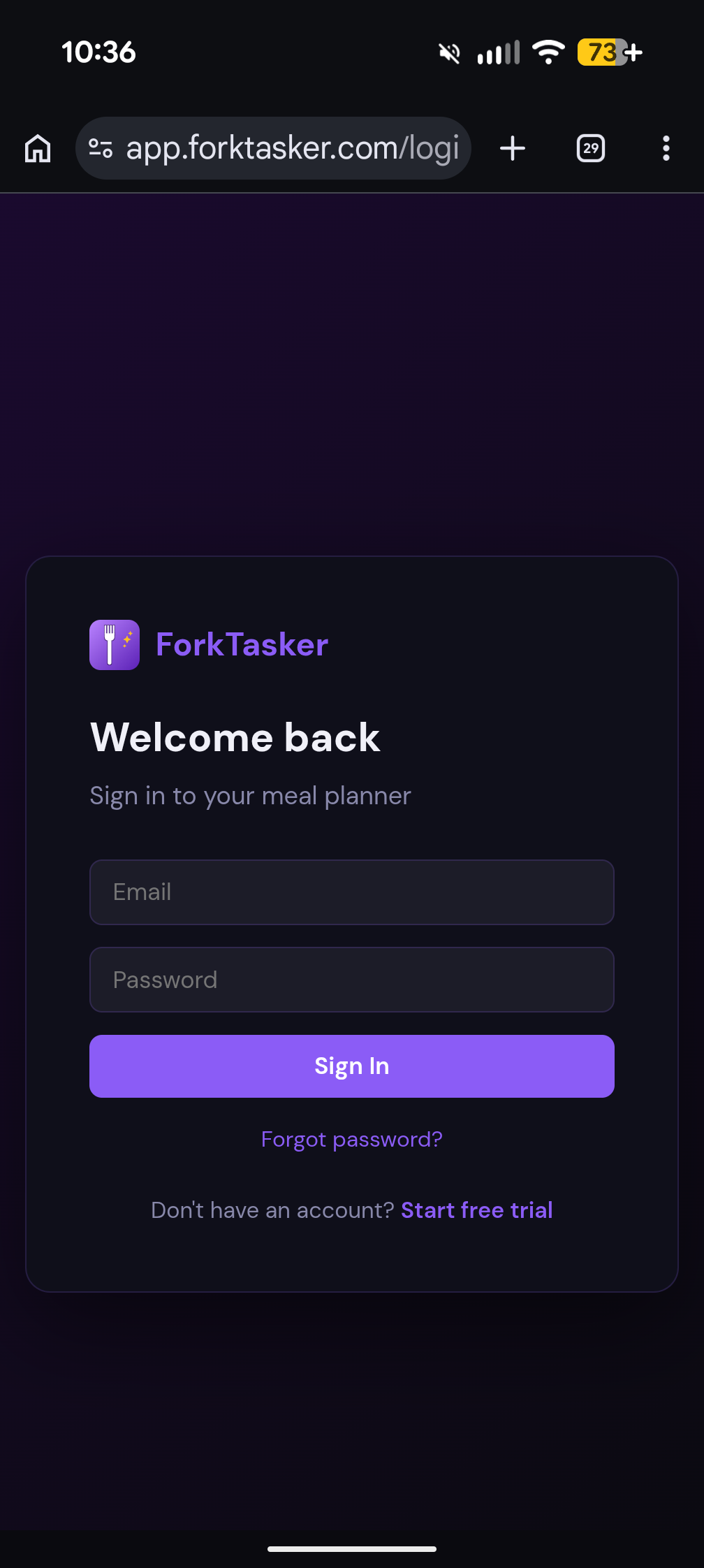
Go to app.forktasker.com Log in to your account first so you're on the main app screen.
ForkTasker open in Chrome on Android
3
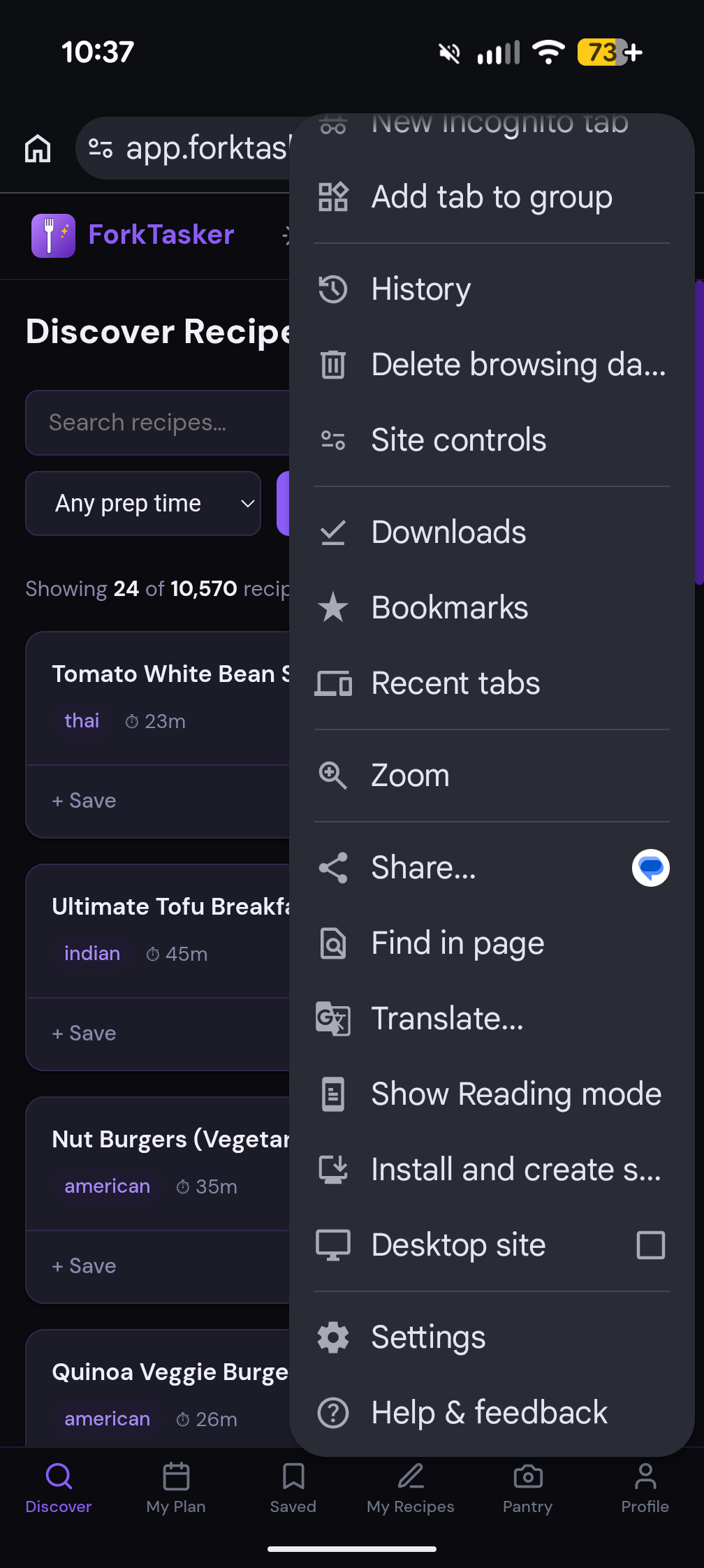
Tap the three-dot menu (โ‹ฎ) in Chrome It's in the top-right corner of the browser. Tap "Add to Home screen" from the menu.
Chrome menu showing Add to Home screen
4
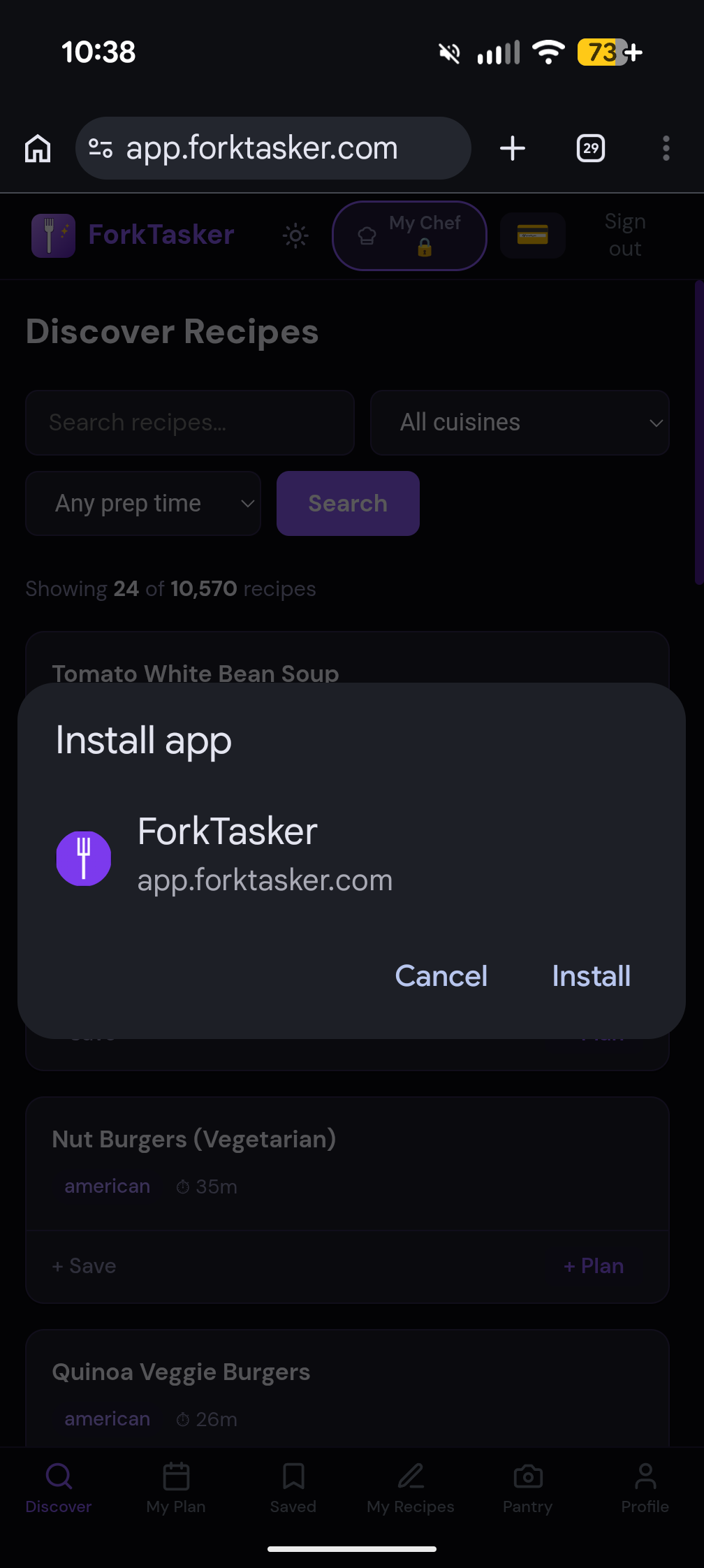
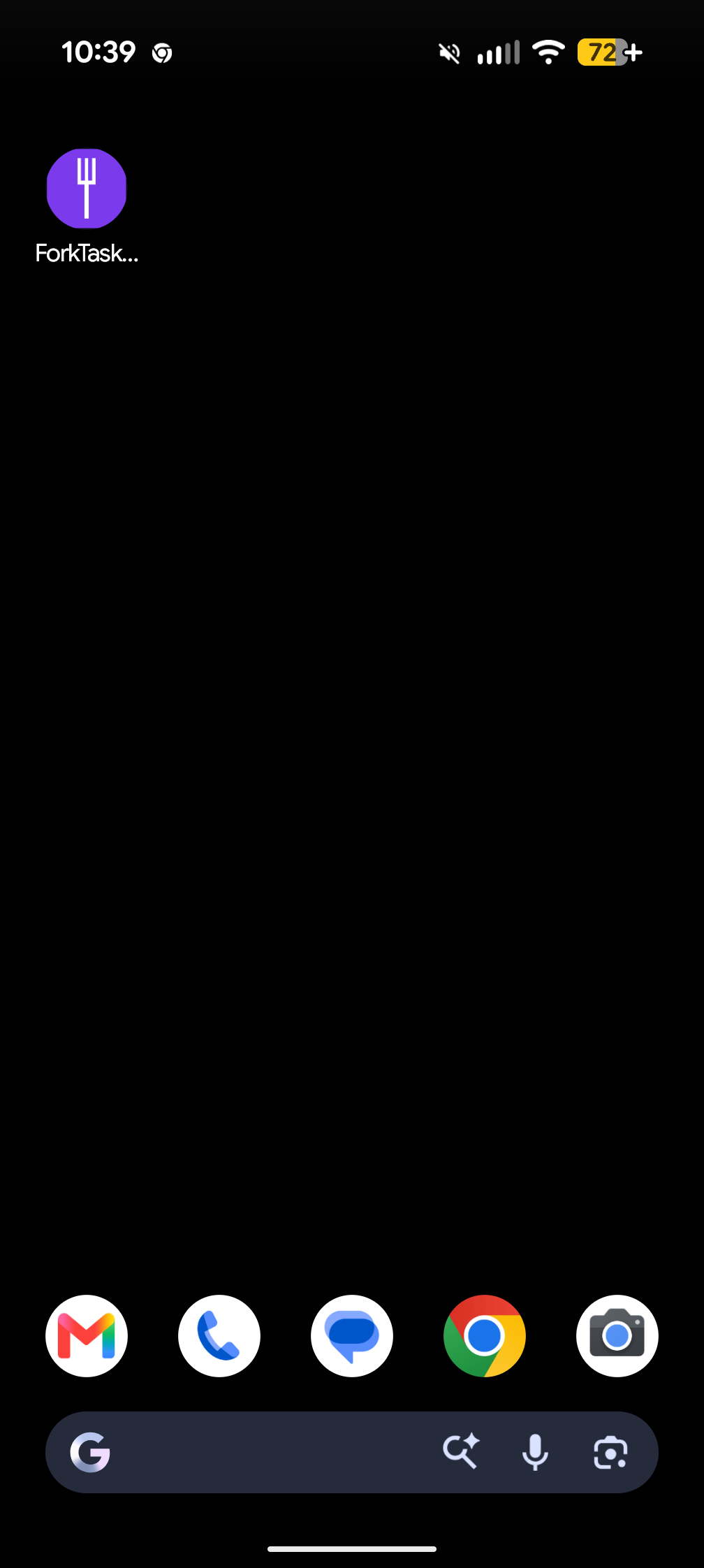
Tap "Add" to confirm A dialog appears with the app name โ€” tap "Add" and the ForkTasker icon lands on your home screen.
Add to Home screen confirmation dialog
Confirm dialog
ForkTasker icon on Android home screen
Icon on home screen
5
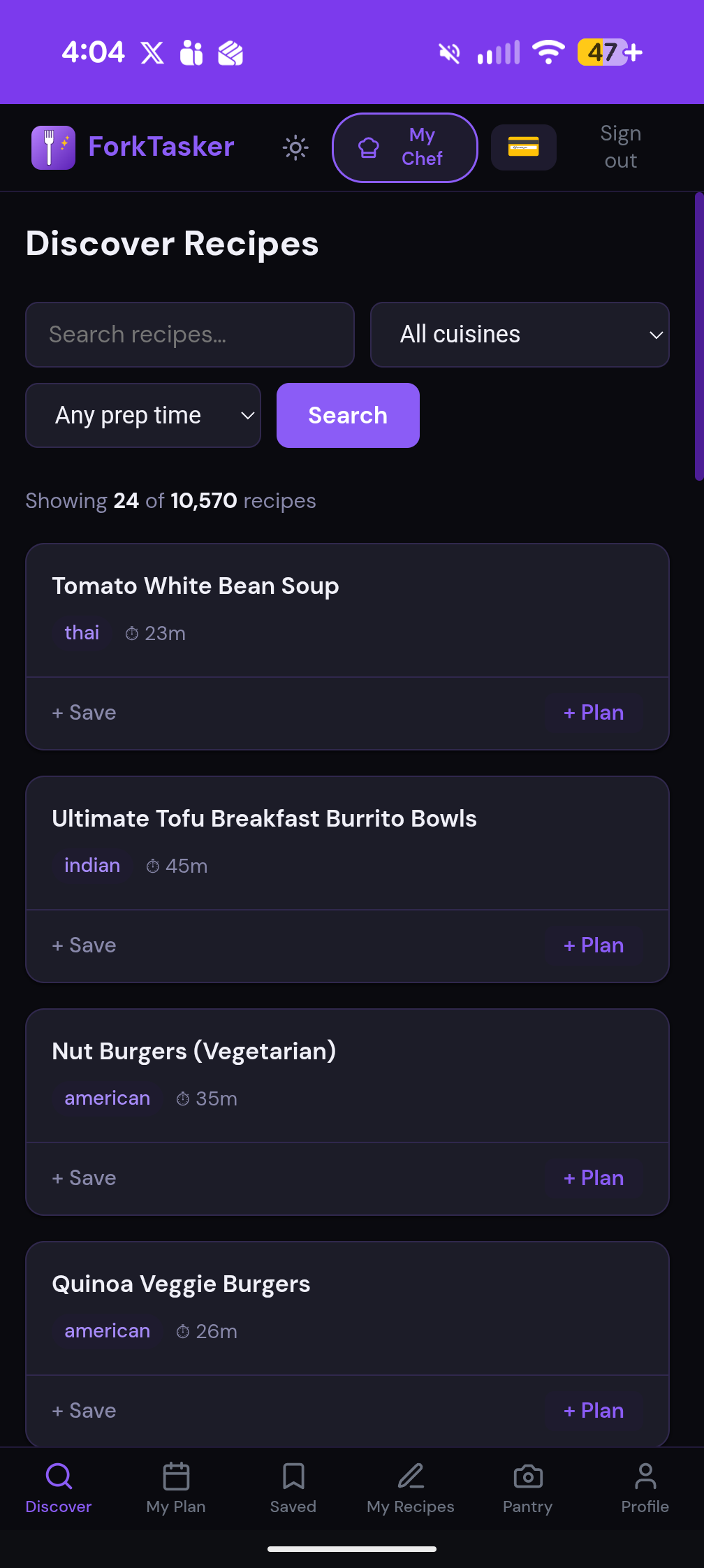
Tap the icon to open ForkTasker It launches full-screen with no browser toolbar โ€” just the app.
ForkTasker launched full screen on Android
  • 1
    Open Safari on your iPhone Important: this only works in Safari on iOS โ€” not Chrome or Firefox on iPhone.
  • 2
    Go to app.forktasker.com Log in to your account so you're on the main app screen.
  • 3
    Tap the Share button at the bottom It looks like a box with an arrow pointing up โ€” in Safari's bottom toolbar.
  • 4
    Scroll down and tap "Add to Home Screen" The icon name will already say "ForkTasker" โ€” tap "Add" in the top-right corner.
  • 5
    Find ForkTasker on your home screen Tap it to open in full-screen mode, just like a downloaded app.
๐Ÿ“ธ
Safari share button screenshot
Tap the Share button (โ†‘) in Safari
๐Ÿ“ธ
"Add to Home Screen" screenshot
Scroll to "Add to Home Screen"
1
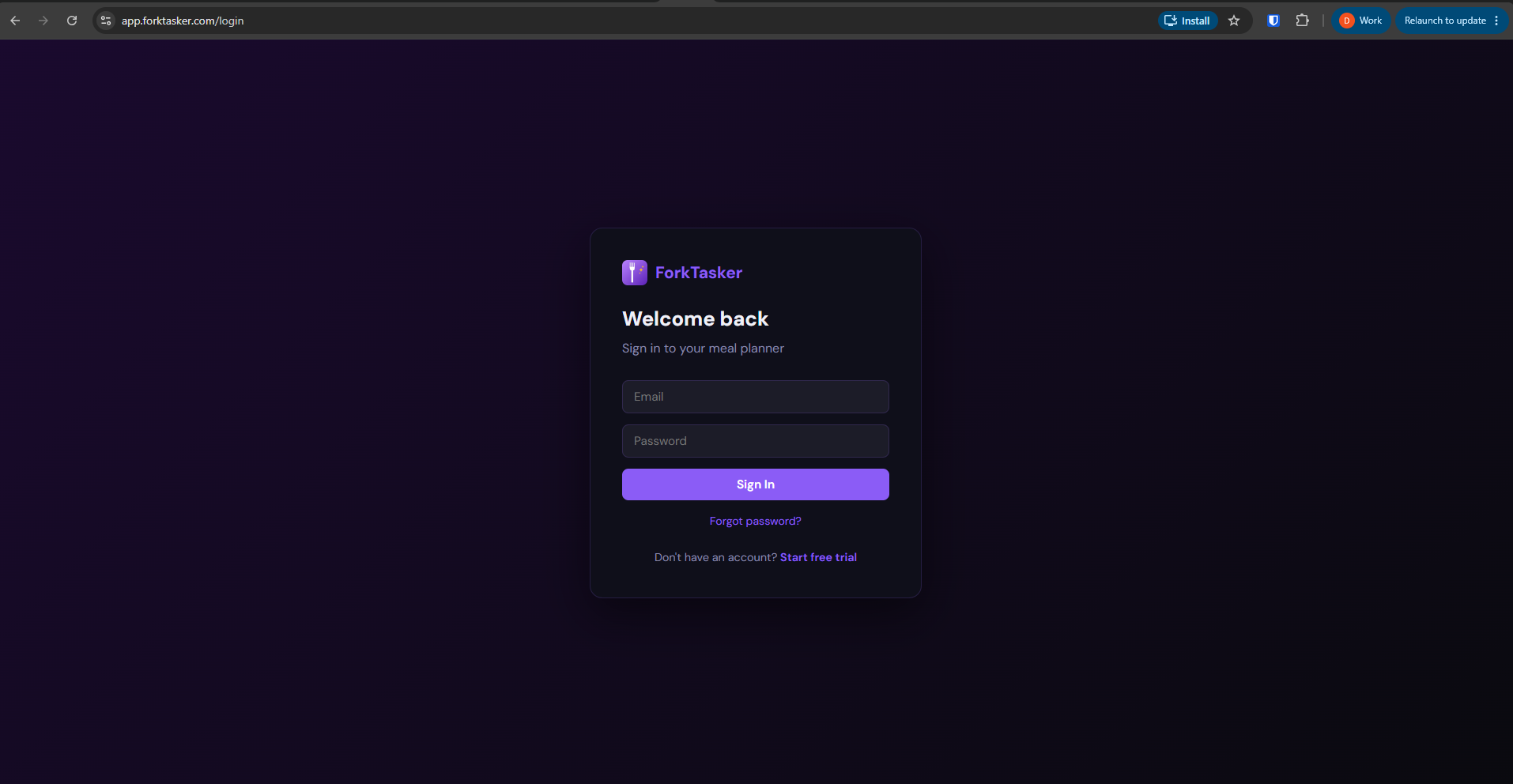
Open Chrome or Edge on your computer Works in Chrome, Edge, and Brave. Not available in Safari or Firefox on desktop.
2
Go to app.forktasker.com and log in You'll see the install option appear once you're on the main app screen.
ForkTasker open in Chrome on desktop
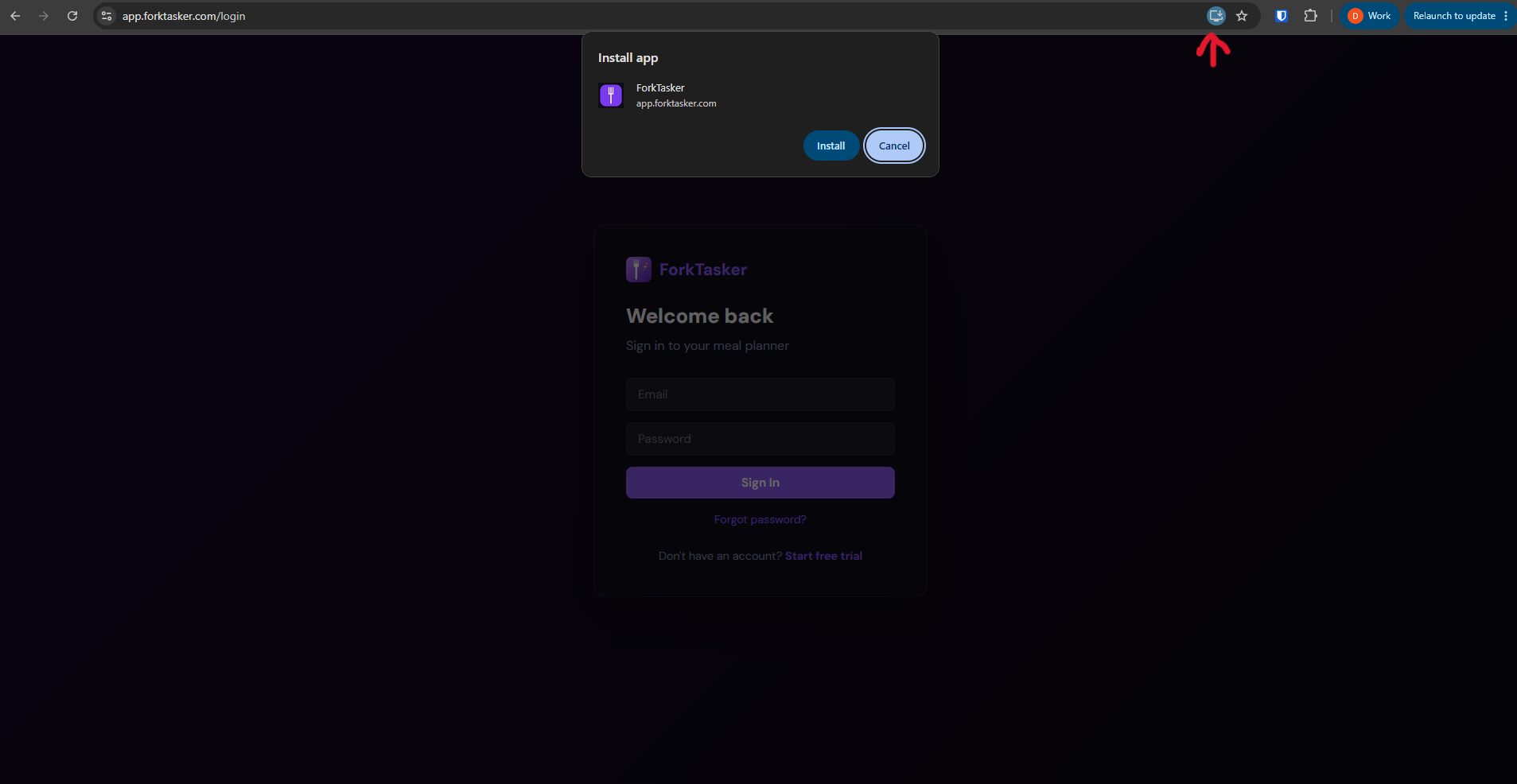
3
Click the install icon in the address bar Look for a small computer icon on the right side of Chrome's address bar. In Edge it's a "+" icon. Click it and select "Install".
Chrome install prompt for ForkTasker
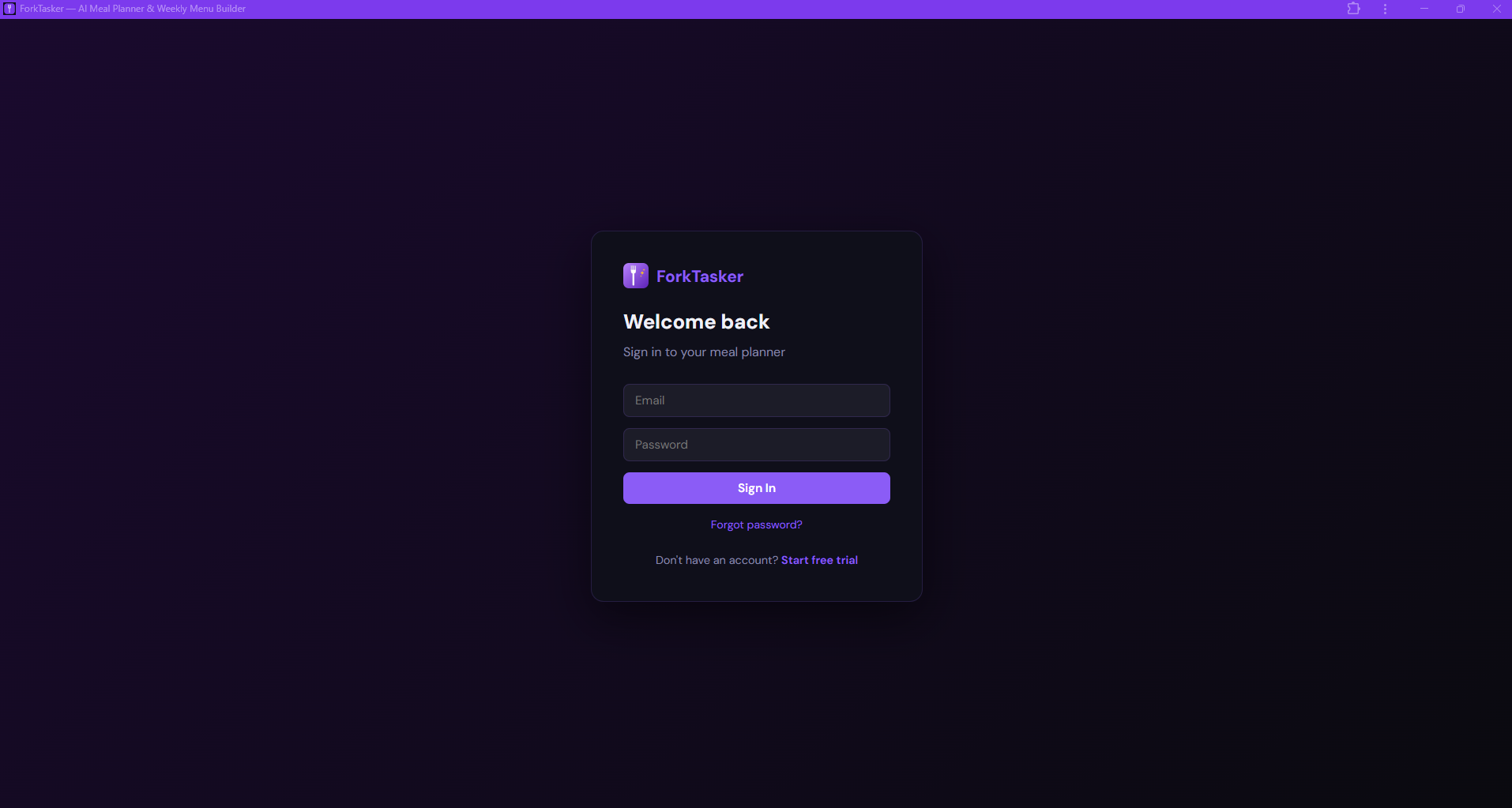
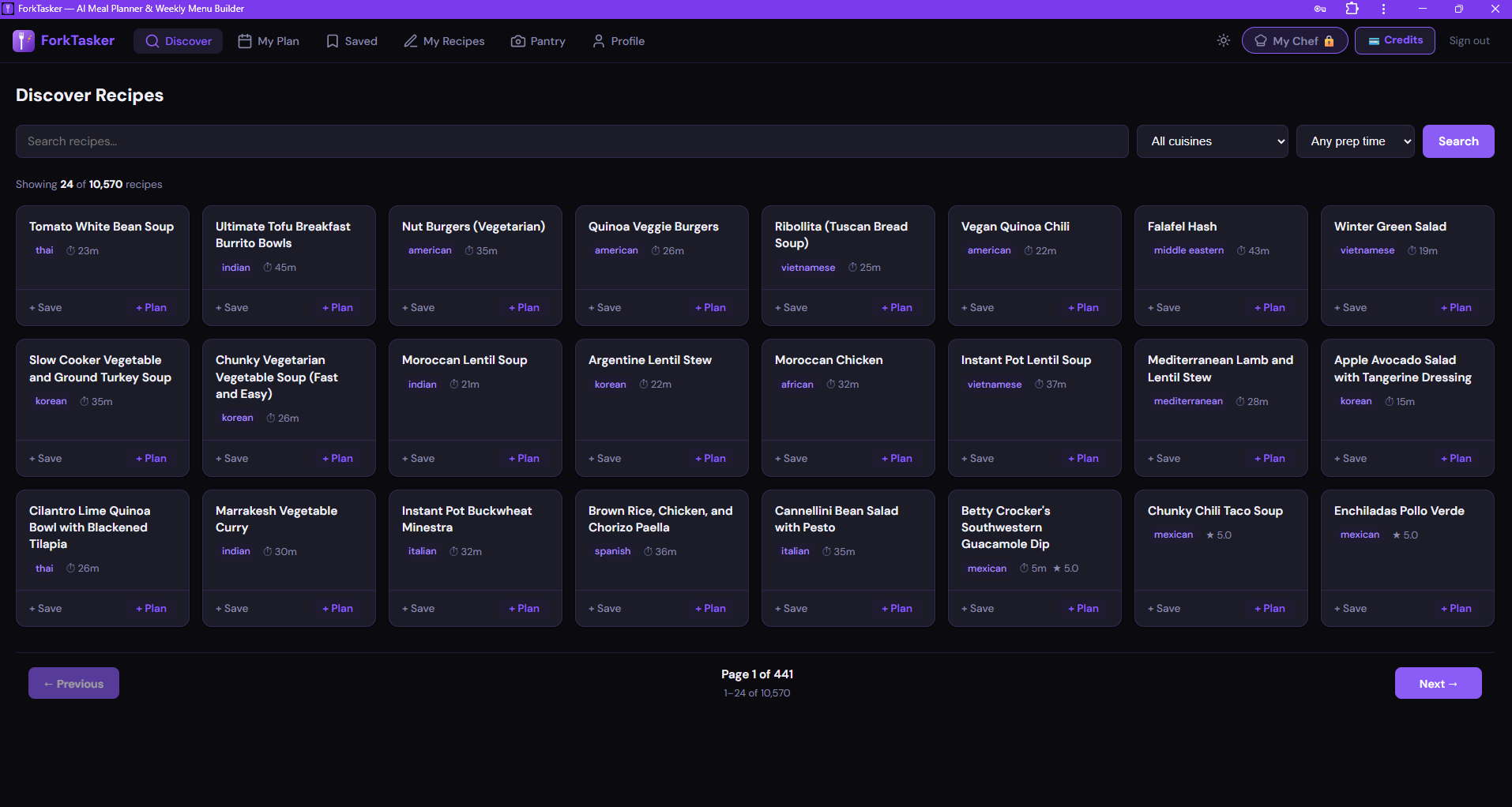
4
ForkTasker opens in its own window No browser tabs, no address bar โ€” just the app. It also gets pinned to your taskbar and Start menu for quick access.
ForkTasker login screen as installed app
Launches as a standalone app
ForkTasker running as installed desktop app
Full app โ€” no browser chrome

Ready to plan smarter?

Your first week is free โ€” no credit card needed.

Start Free Trial โ†’